
Moving Target Password Shifter1.62 - Get APK
You'll be able to download in few seconds.
Publisher Description
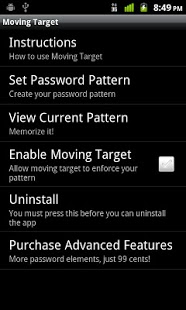
Don’t keep the same lockscreen password! Moving Target automatically updates your lockscreen password, greatly increasing your phone’s security.
Set up a password pattern - for example, the letters “QzY” followed by the current hour. Enable Moving Target and it’ll keep that hour field updated for you! Any hour of the day, when you turn your phone on and are asked for your password, type QzY and then look in the corner of the screen and type the current hour. If it’s 8:30 right now, your lockscreen password is QzY8 - when the clock strikes 9, it’ll be QzY9.
You can make more sophisticated dynamic passwords too! You can add the current day of the month, or even the current minute for a super-secure password. Your password pattern is easily customizable!
The free version of Moving Target allows you to put the current hour (1-12) or current date (1-31) in your password; a cheap upgrade enables the other password element types (24-hour, minute, first letter of weekday).
If you have any problems or feedback, please email me: movingtarget@richardcarter.org.
Disable all task killers!! If Moving Target gets killed, it will obviously not be able to update your password! If this happens and you are locked out of your phone, try restarting the phone - this should restart Moving Target which will then set your password again according to your pattern.
Moving Target uses very little battery and does not “phone home”. It utilizes standard, built-in systems in Android to ensure that it does not malfunction or stop working. Once you set your password pattern, you can expect your lockscreen password to keep updating forever and you shouldn’t ever have to fiddle with settings until you want to change or disable the password. If you are using an app killer, make sure it doesn't kill Moving Target or else it may not be able to keep your password updated!
Unfortunately, Moving Target cannot set a pattern lock. If you use only numbers in your password pattern, it will use the “PIN” style lockscreen which simply displays a number pad; otherwise, a more complicated pattern will show the whole keyboard.
I don't recommend using a custom lock screen with this app; it may not be made to handle the changing password, which could result in your getting locked out of your phone.
I do not take responsibility for any malfunctions of the app or damage that may occur from said malfunctions, however I STRONGLY assure you it has been THOROUGHLY tested. If you have problems with the app, please email me and I will do my best to help fix them. Also try restarting your phone; sometimes low or corrupted memory can do funny things with your phone software (you may need to take your battery out). I cannot unlock a phone for which you have forgotten the password pattern - there are no "backdoors" in the app - so please, please, PLEASE be careful to memorize and/or write down your password pattern so you don't forget it!
About Moving Target Password Shifter
The company that develops Moving Target Password Shifter is Ricket. The latest version released by its developer is 1.62.
To install Moving Target Password Shifter on your Android device, just click the green Continue To App button above to start the installation process. The app is listed on our website since 2011-12-01 and was downloaded 0 times. We have already checked if the download link is safe, however for your own protection we recommend that you scan the downloaded app with your antivirus. Your antivirus may detect the Moving Target Password Shifter as malware as malware if the download link to org.inh.android.movingtarget is broken.
How to install Moving Target Password Shifter on your Android device:
- Click on the Continue To App button on our website. This will redirect you to Google Play.
- Once the Moving Target Password Shifter is shown in the Google Play listing of your Android device, you can start its download and installation. Tap on the Install button located below the search bar and to the right of the app icon.
- A pop-up window with the permissions required by Moving Target Password Shifter will be shown. Click on Accept to continue the process.
- Moving Target Password Shifter will be downloaded onto your device, displaying a progress. Once the download completes, the installation will start and you'll get a notification after the installation is finished.
Program Details
System requirements
Download information
Pricing
Version History
version 1.62
posted on 2011-12-01
1.62: Pressing the Uninstall option warns that the password won't automatically be removed, just like the Disable checkbox does. Thanks to Joe for this suggestion.,1.61: The "literal" textbox on the add password element screen should not auto-capitalize the first letter on any keyboard now. Apologies and thanks to reviewer Melonics who was almost locked out because of this; our test device keyboards did not have this behavior.
version 1.62
posted on 2011-12-01
Several fixes and updates
Disclaimer
External Download
We do not host Moving Target Password Shifter on our servers. We did not scan it for viruses, adware, spyware or other type of malware. This app is hosted by Galad and passed their terms and conditions to be listed there. We recommend caution when installing it.
The APK Download link for Moving Target Password Shifter is provided to you by apps112.com without any warranties, representations or guarantees of any kind, so access it at your own risk.
If you have questions regarding this particular app contact the publisher directly. For questions about the functionalities of apps112.com contact us.
